Patients who register for the AKDHC Patient Portal have access to pertinent health information 24/7 which includes, visit summaries, lab and imaging results, patient education materials and more. Patients can also exchange secure portal messages directly with their physician’s staff.
Please follow the Best Practices identified below and view the “Learn More” page on the Portal Log in screen to get the most out of your portal access.
AKDHC Patient Portal Best Practices
- A valid email address is required for Portal Registrations and will be used as your Portal log in “username”. Provide AKDHC with an email address that has a domain that meets security transport guidelines required by our portal vendor. Most major email providers like, Yahoo, Gmail, iCloud, and Microsoft Hotmail meet these security requirements.
If you provide AKDHC with an email address that does not have these security protocols in place our email communications may fail to reach you. This typically happens when patients use an email carrier from their work or other private email servers.
- The following browsers are supported by our portal vendor – always use the most up to date version of a supported browser:
-
- Apple Safari 9 and later
- Google Chrome 30.0 and later
- Microsoft Edge 13.0 and later
- Mozilla Firefox 40 and later
- Opera 35 and later
- The portal can only be accessed with a US-based IP Address – if you are trying to log into your Portal account while out of the United States you will be unable to access the portal.
- The demographic information and email account found in your AKDHC electronic health record (EHR) will be used for your portal account. When completing your registration for a portal account enter your demographic information that you provided AKDHC. If the portal cannot match the information you are entering with the information found in the EHR you may not be able to complete your portal registration.
- Always use the Patient Portal Login link found on the AKDHC website to access your portal account.
- If you are experiencing issues with your Password:
-
- Verify that neither of the login fields are pre-populating with information. If you are using the browser's 'auto-fill' feature you may be trying to login with stored old information and cause the system to recognize your credentials as incorrect.
- Check that the Number Lock and/or Caps Lock are set appropriately – you may be typing a password in the wrong case if the Caps Lock is turned on, or you may not be typing any numbers in your password correctly if the Number Lock is off.
- If the above actions to do not correct the login issue perform a password reset by using the “Forgot your Password?” link on the Portal Login screen.
Additional support information can be found on the “Learn more” link on the Portal Login screen (see below)
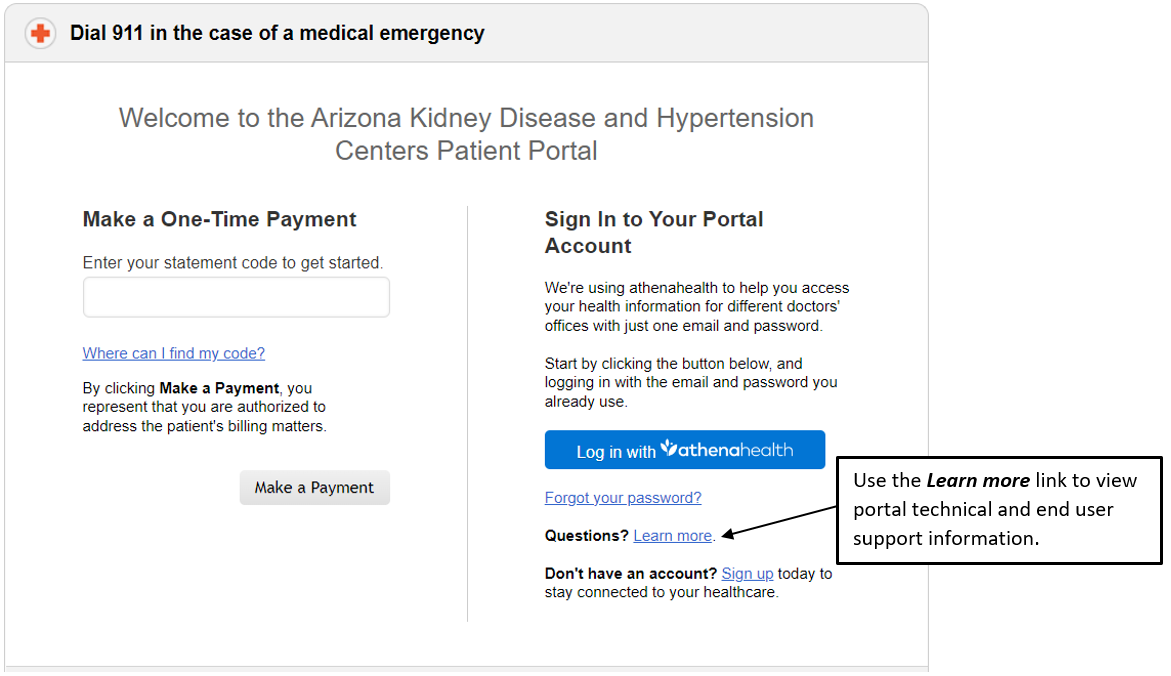

 Patient Portal Login